Python Tutorial: Analysing Public Property-Price Data with pandas

HM Land Registry publishes every residential property sale in England and Wales as a free CSV, under the Open Government Licence. This tutorial loads one year of it (931,453 rows) with pandas, keeps the standard market sales, and answers three questions: how the median price moved month by month, which districts are most and least expensive, and why a median can jump for reasons that have nothing to do with prices.
The dataset and its licence
Price Paid Data covers sales lodged with HM Land Registry since January 1995 and is updated on the 20th working day of each month. It is released under the Open Government Licence v3.0, which allows reuse, including commercial reuse, as long as you include the attribution statement:
Contains HM Land Registry data © Crown copyright and database right 2021. This data is licensed under the Open Government Licence v3.0.
The addresses are derived from Royal Mail and Ordnance Survey data and come with an extra condition: personal or non-commercial use, or display for residential property price information services; other uses need Royal Mail's agreement. This tutorial only aggregates prices by area, which keeps well within those terms.
Download the yearly file for 2024 (about 162 MB) from the downloads page, or directly:
curl -O https://price-paid-data.publicdata.landregistry.gov.uk/pp-2024.csvCode below was run on 24 October 2026 with Python 3.13, pandas 3.0.5 and matplotlib 3.11.2, on the file as published on 29 September 2026. Late registrations are added every month, so if you download a newer copy the counts may differ slightly.
Step 1: load a headerless CSV with explicit types
The file has no header row. The column order is documented in HM Land Registry's explanation of the data: transaction ID, price, date of transfer, postcode, property type, old/new, duration (tenure), PAON, SAON, street, locality, town/city, district, county, PPD category type and record status. Name them yourself, load only what you need, and give pandas the types up front: low-cardinality codes become category, which saves memory and speeds up grouping.
import pandas as pd

COLUMNS = [
    "transaction_id", "price", "date", "postcode", "property_type",
    "new_build", "tenure", "paon", "saon", "street", "locality",
    "town", "district", "county", "ppd_category", "record_status",
]

df = pd.read_csv(
    "pp-2024.csv",
    header=None,
    names=COLUMNS,
    usecols=["price", "date", "postcode", "property_type", "new_build",
             "tenure", "district", "ppd_category"],
    dtype={
        "price": "int64",
        "postcode": "string",
        "property_type": "category",
        "new_build": "category",
        "tenure": "category",
        "district": "string",
        "ppd_category": "category",
    },
    parse_dates=["date"],
)
print(df.shape)
print(df["date"].min(), df["date"].max())
(931453, 8)
2024-01-01 00:00:00 2024-12-31 00:00:00header=None is essential: without it, pandas would treat the first sale as column names and silently drop it. The file is plain ASCII, but if you ever load an export that fails with a decoding error, see fixing UnicodeDecodeError in read_csv.
Step 2: understand the codes before filtering
print(df["ppd_category"].value_counts())
print(df["property_type"].value_counts())
ppd_category
A 763905
B 167548
Name: count, dtype: int64
property_type
S 252107
T 250137
D 211340
F 163884
O 53985
Name: count, dtype: int64Category A is a standard sale of a single residential property at full market value. Category B, recorded since October 2013, groups repossessions, buy-to-let purchases identified by a mortgage, transfers to companies and sales of property type O (other), which includes non-residential and mixed sites. Property types D, S, T and F are detached, semi-detached, terraced and flats or maisonettes. For a market price analysis, keep category A and drop type O:
std = df[(df["ppd_category"] == "A") & (df["property_type"] != "O")].copy()
std["property_type"] = std["property_type"].cat.remove_unused_categories()
print(len(std))
print(std["price"].describe().round(0))
763905
count 763905.0
mean 369875.0
std 405756.0
min 1.0
25% 195000.0
50% 291000.0
75% 432000.0
max 74933000.0
Name: price, dtype: float64Two things stand out. The mean (£369,875) is far above the median (£291,000), as always with prices: a few very expensive sales pull the average up, which is why the rest of this tutorial uses medians. And the minimum is £1. Check how unusual such values are before deciding what to do:
print(std["postcode"].isna().sum())
print((std["price"] < 10_000).sum())
165
5Five sales under £10,000 out of 763,905 cannot move a median, so they can stay; drop them if you compute means. The 165 rows without a postcode do not matter here either, because we group by district, which is always filled.
Step 3: median price by month
Convert the date to a monthly period, then aggregate with named outputs:
std["month"] = std["date"].dt.to_period("M")
monthly = std.groupby("month")["price"].agg(sales="count", median_price="median")
print(monthly)
sales median_price
month
2024-01 45798 281710.0
2024-02 50725 280000.0
2024-03 58465 280000.0
2024-04 52066 280000.0
2024-05 63322 288000.0
2024-06 62381 295000.0
2024-07 68859 295000.0
2024-08 74776 300000.0
2024-09 66591 300000.0
2024-10 77498 300000.0
2024-11 74501 295000.0
2024-12 68923 296400.0Notice the round numbers: prices cluster at £280,000, £295,000 and £300,000, so medians move in steps. The sales column matters as much as the price: a median from 45,000 sales is solid; a median from 30 sales in a small area is not.
Step 4: compare districts
The district column holds the local authority. Group, keep districts with enough sales to be meaningful, and sort:
by_district = (
    std.groupby("district")["price"]
       .agg(sales="count", median_price="median")
       .query("sales >= 1000")
       .sort_values("median_price", ascending=False)
)
print(len(by_district))
print(by_district.head(3))
print(by_district.tail(3))
301
sales median_price
district
KENSINGTON AND CHELSEA 1743 1237500.0
CITY OF WESTMINSTER 2372 970000.0
HAMMERSMITH AND FULHAM 2453 825000.0
sales median_price
district
BLACKPOOL 2015 135000.0
HYNDBURN 1140 132500.0
BURNLEY 1484 130000.0District names are upper case and follow official naming, which is not always the everyday one: Bristol is CITY OF BRISTOL. Check the exact spelling with std["district"].unique() or str.contains before filtering.
Step 5: one line per city with a pivot
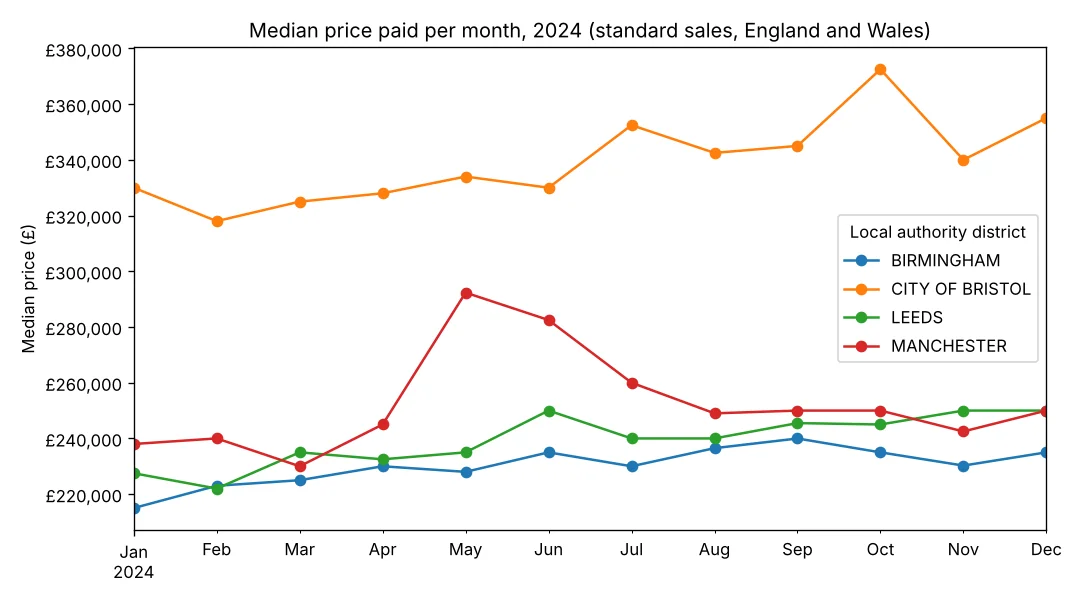
cities = ["BIRMINGHAM", "CITY OF BRISTOL", "LEEDS", "MANCHESTER"]
pivot = (
    std[std["district"].isin(cities)]
      .groupby(["month", "district"])["price"]
      .median()
      .unstack("district")
)
print(pivot)
district BIRMINGHAM CITY OF BRISTOL LEEDS MANCHESTER
month
2024-01 215000.0 330000.0 227500.0 238000.0
2024-02 223000.0 318000.0 222000.0 240000.0
2024-03 225000.0 325000.0 235000.0 230000.0
2024-04 230000.0 328000.0 232500.0 245000.0
2024-05 228000.0 334000.0 235000.0 292338.5
2024-06 235000.0 330000.0 250000.0 282500.0
2024-07 230000.0 352455.0 240000.0 260000.0
2024-08 236500.0 342500.0 240000.0 249000.0
2024-09 239975.0 345000.0 245500.0 250000.0
2024-10 234999.5 372500.0 245000.0 250000.0
2024-11 230250.0 340000.0 250000.0 242500.0
2024-12 235000.0 355000.0 250000.0 250000.0Manchester's median jumps from £245,000 in April to £292,338.50 in May, then falls back. Did Manchester prices rise 19% in a month? Check what was sold:
manc = std[std["district"] == "MANCHESTER"]
share_flats = (manc["property_type"] == "F").groupby(manc["month"]).mean().round(2)
print(share_flats.loc["2024-04":"2024-06"])
month
2024-04 0.39
2024-05 0.65
2024-06 0.48
Freq: M, Name: property_type, dtype: float64Flats made up 65% of Manchester's standard sales in May, against 39% in April. A change in the mix of homes sold, typically a batch of completions in new city-centre blocks, moves a simple median as much as a real price change. Official indices such as the UK House Price Index correct for this with a hedonic regression model; for your own analysis, the simplest fix is to compare like with like:
by_type = std[std["district"].isin(cities)].pivot_table(
    index="district", columns="property_type", values="price",
    aggfunc="median", observed=True,
)
print(by_type)
property_type D F S T
district
BIRMINGHAM 450000.0 159000.0 257000.0 210000.0
CITY OF BRISTOL 580000.0 255000.0 370000.0 375000.0
LEEDS 413000.0 160000.0 250000.0 190000.0
MANCHESTER 408500.0 250000.0 282000.0 230000.0observed=True keeps only category combinations that actually occur, and avoids the FutureWarning that pandas 2.x prints about the default for categorical groupers.
Step 6: plot it
import matplotlib
matplotlib.use("Agg")
import matplotlib.pyplot as plt
from matplotlib.ticker import StrMethodFormatter

ax = pivot.plot(figsize=(9, 5), marker="o")
ax.set_title("Median price paid per month, 2024 (standard sales, England and Wales)")
ax.set_xlabel("")
ax.set_ylabel("Median price (£)")
ax.yaxis.set_major_formatter(StrMethodFormatter("£{x:,.0f}"))
ax.legend(title="Local authority district")
plt.tight_layout()
plt.savefig("median-prices-2024.png", dpi=120)
matplotlib.use("Agg") renders to a file without a display, which is what you want in a script or on a server; drop it in a notebook. pandas plots a PeriodIndex with proper month labels.
Limits to keep in mind
- Not every sale is there. HM Land Registry excludes, among others, sales not for value, right-to-buy sales at a discount, transfers of a share of a property and transfers by court order.
- Recent months are incomplete. Registration typically lags completion by two weeks to two months, so the latest months in a fresh download always look thin.
- No size, no rooms. The data has no floor area or bedroom count, so you cannot compute a price per square metre without joining another source, such as energy certificate data, by address.
- A median is not a valuation. A median for a district is a market summary, not the value of a particular home: to compare a specific flat with similar ones nearby, an online valuation tool or a local agent's appraisal takes size, condition and floor into account.
Summary
Load Price Paid Data with header=None and your own column names, set dtype and parse_dates up front, keep category A and drop property type O for market prices, aggregate with groupby(...).agg(sales="count", median_price="median"), and always print the counts next to the medians. When a median jumps, check the mix of property types before calling it a price change. Keep the attribution statement with anything you publish.
 Data
DataUnicodeDecodeError in read_csv
Why pd.read_csv raises UnicodeDecodeError: 'utf-8' codec can't decode byte, and how to fix it with the right encoding, BOM handling and UTF-8 conversion.
 Data
DataSuppress scientific notation
Stop pandas and NumPy printing floats like 1.2e+09: set_printoptions(suppress=True), display.float_format, option_context, Styler and to_csv.
 Data
DataKurtosis in Python
Compute kurtosis in Python with scipy.stats.kurtosis, pandas Series.kurt and NumPy. Excess vs Pearson, the bias flag, worked examples and how to interpret it.